
Microsoft Store
Install FUSE from the Microsoft Store.
Get from Microsoft Store Free · View requirements in the StoreInstall from the Microsoft Store or download the portable ZIP.
The October upgrade preview, including one-click coding-tool setup, is not yet included in these downloads. No public macOS download is available.
Install FUSE from the Microsoft Store.
Get from Microsoft Store Free · View requirements in the StoreExtract, open, and work in your browser.
No installation needed.
Direct downloads are unsigned. Windows or your organisation may block them.
Standalone installers remain on RC28. Choose one format. Portable and installed versions keep separate workspaces.
Extract the ZIP into a writable folder. Open Start FUSE.cmd. For a desktop shortcut, run Create FUSE shortcut.cmd once. Keep the extracted folder; recreate the shortcut if you move it.
Edge or Chrome is recommended. The runtime is included. PowerShell must be available for the private launch file, saved passwords, and file dialogs. If the window does not open, use the private launch file shown in the console.
Before closing the portable, wait for Workspace saved, close the app window, then close the console. To update, extract the new version into a new folder. Keep your SQL files and the FUSE workspace in your Windows user profile. Run one portable version at a time.
Installed versions do not import the portable workspace. Save your SQL before switching versions. For direct installers, use the same format and folder when updating. Uninstall through Windows Settings > Apps; leave Delete application data unchecked in the EXE uninstaller to keep saved work.
The ZIP, EXE, and MSI files are unsigned. Follow your organisation's software policy. If a download is blocked, ask your administrator.
RC30 build 2 removes the Investigations workbench. Result analysis, comparisons, Excel export and the report catalog remain available. The native EXE/MSI remain on RC28 (1.0.28); the Microsoft Store listing retains its own version. See the portable guide for build checks and the remaining Windows and tenant validation.
Editor menus, typed inputs, result analysis and Excel export.
File, Edit, View and Query organise secondary actions while Run, Save and your connection stay visible. Right-click SQL for context actions.
Use keyboard navigation, format selected SQL, and keep each tab's Undo history.
Sort and filter by type, Shift-click for multi-sort, inspect duplicate groups and calculate exact totals for selected cells.
Export the current view, all fetched rows or selected cells to Excel, CSV or JSON. Excel preserves values as text, with a frozen header and filters.
Choose List of values for IN (:name) or NOT IN (:name). Paste one column and review its type, count and invalid entries.
Values stay separately bound. Single-value inputs remain the default, and named presets load only when requested.
Named workspaces, SQL shortcuts, read-only report browsing and catalog snapshots remain included. Compare fetched results using business keys. Read the portable guide →
Launch the installed app, or extract the portable ZIP and open Start FUSE.cmd.
Add your Fusion details and select HCM or Financials / SCM. Choose Save & test. Additional settings are under Advanced.
Use an authorised non-production environment. Connection setup can create missing BI Publisher files; it does not overwrite existing models.

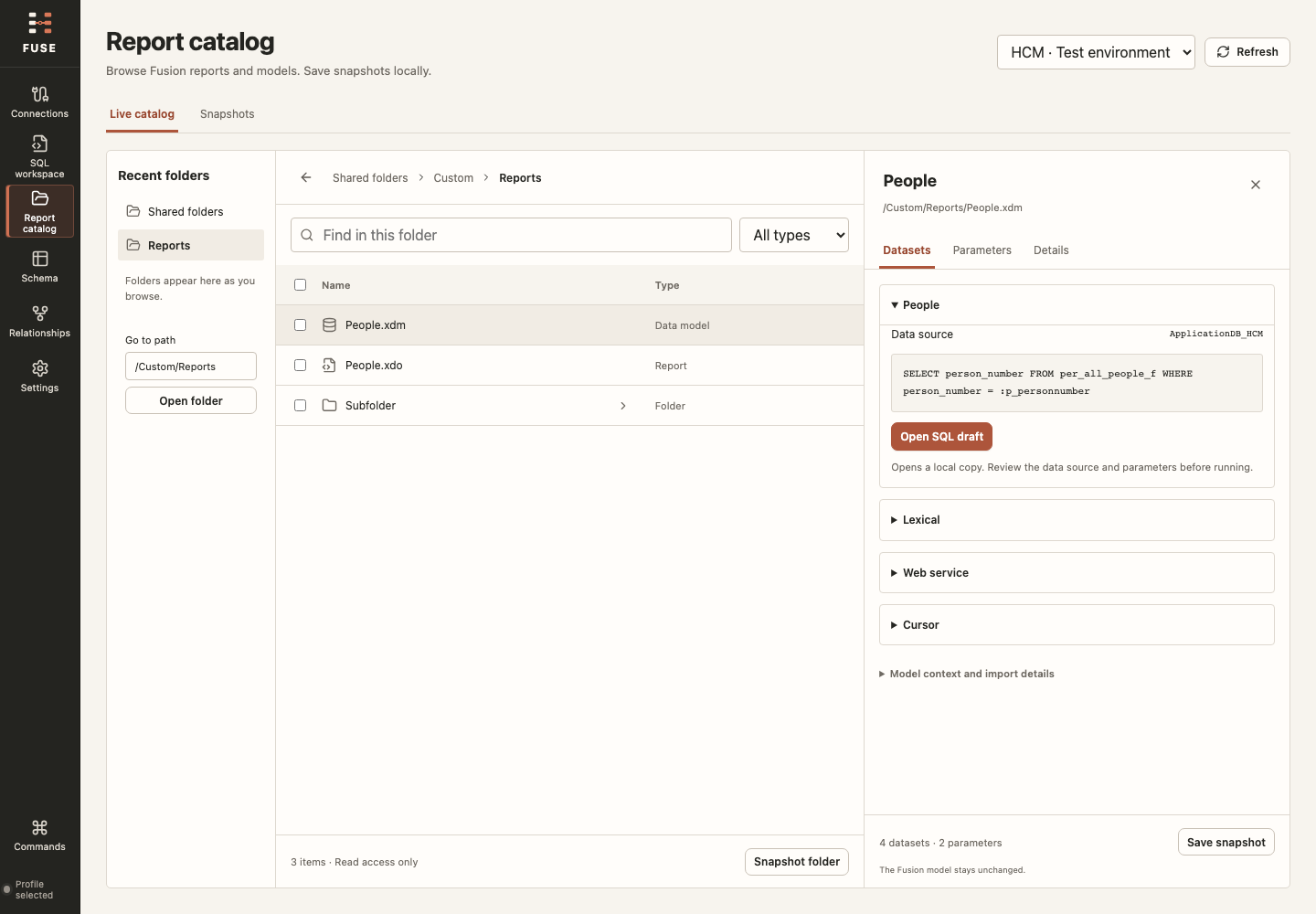
Inspect folders and model definitions in light or dark.
RC30 keeps Text, Number, Date, Timestamp and NULL separate from your SQL. Use Text for identifiers with leading zeros. Give inputs readable labels and descriptions, and mark required values.
List mode accepts 1–500 values per list, with at most 512 expanded binds per query. Use a parameter alone inside IN (:name) or NOT IN (:name). Larger lists may require a newer parameter model in a new approved folder; existing models are not replaced automatically.
Definitions do not save values. Named presets save values only when you explicitly choose to save them, and load only when you ask. Profiles belong to the exact SQL and connection. Treat presets as business data.
Catalog snapshots preserve original export bytes and checksums, record skipped items and limits, and support offline inspection and comparison. They use FUSE's snapshot format; they are not Oracle catalog import archives.
Copied SQL does not recreate a model's full execution context. Review its data source and parameters before running.
Snapshots and presets are local files without FUSE encryption. Review their SQL and business data before exporting or sharing, and keep appropriate backups.
Excel workbooks are created locally, with cancellation. Non-null values are text to preserve long IDs, leading zeros and exact decimal representations. Convert chosen columns in Excel when appropriate. Formula-looking values stay literal.
Analysis covers fetched data, not the whole Fusion database. Export scope is explicit: Current view, All fetched or Selected cells. Exports support up to 32 MiB of source text. Excel cells are limited to 32,767 UTF-16 units; oversized values fail with guidance rather than being silently truncated.
Up to 1 MiB of SQL text and 10,000 rows, 512 columns, or 500,000 result cells. Your Oracle environment may allow less. Export the current view, all fetched rows or selected cells. All fetched uses rows already retrieved; it does not run another query.
Each execution accepts a single SELECT or WITH statement and blocks direct data-changing SQL. Custom functions can still have side effects under your Oracle permissions. Use least-privileged access.
The query queue reviews up to 20 statements and collects their parameters separately. It runs sequentially, with up to 1,000 rows per statement and 10,000 in total. Stop prevents remaining queries from starting; an in-flight request may finish. The last completed result appears in the normal grid for analysis and export.
New HCM and Financials / SCM connections use the included V3 model. Working connections need no general model update. Typed inputs may need the separate parameter-report setup described in the portable guide.
Connect Codex or Claude through Settings > Coding tools. You approve each query request in FUSE. Permissions reset each session. Review the exact typed inputs, including list values, alongside the SQL and connection. Changing any of them requires a new approval.
Result sharing is off by default. Optional samples need your permission and may reach the coding tool's provider without automatic redaction. Samples are limited to 100 rows, 100 columns, and 64 KiB, and expire after five minutes. Clearing a sample cannot recall copies already shared.
The companion does not expose saved passwords, queries, drafts, or history. Your coding tool's separate file permissions still apply. See the privacy notice.
Look up HCM, Financials, Common, Procurement and Supply Chain objects in the bundled schema reference. Coverage varies. Check the linked Oracle documentation before using a column or join; your tenant permissions still apply.
Report tools prepare SQL, data models, report definitions, starter RTF layouts, and optional chart definitions. They do not upload or run reports. Review the files before importing them into BI Publisher.
43.8 MB · 43,779,802 bytes
e68bc4f576669beb3b368b4f9aa055b4be88640c2f67537b816a62800d2ff414In PowerShell, from your download folder:
Get-FileHash -Algorithm SHA256 -LiteralPath '.\FUSE-1.0.0-rc.30-build.2-windows-x64-browser-portable.zip'A checksum confirms file integrity, not publisher trust.
43,767,090 bytes · Windows 11 x64 · Unsigned
70983bc13f2f4c74ca563f850ff6015b9da20f1aa0771320d2c1606985bed4be45,357,168 bytes · Windows 11 x64 · Unsigned
4418f93b6aed9c6cfb270f12d47d2e28328072f0017a6fecf10a7af3dae25fb241,797,585 bytes · Windows 11 x64 · Unsigned
02b1c58713eb17554aac7fcb287c2f9ae4c26b5e958847c52337c8c2dddfa1d040,561,578 bytes · Windows 11 x64 · Unsigned
668886db3aae745255e8a42e32470809a6d00f3bdcd5cd177a4790cf9bcd9bb139,940,171 bytes · Windows 11 x64 · Unsigned
a2913a8ba89b771b65755c931d27b6313512baac5856a53ad9fd23d44b733a9139,926,848 bytes · Windows 11 x64 · Unsigned
87bb258e52e08c92eb196bbeca191677ddd4e85c4b3eb6fbf9e388445ea2955bFUSE is independent software, with no Oracle affiliation or endorsement. Oracle is a registered trademark of Oracle and/or its affiliates.